Every development team uses Git. But not every team has a branching strategy, and that is where the chaos starts. Merge conflicts pile up, hotfixes go to the wrong branch, and nobody knows which branch has the latest working code.
This guide compares the three most popular branching strategies and helps you pick the right one for your team size and release cycle.
Why Branching Strategy Matters
Without a strategy, you get:
- Developers working on the same files in long-lived branches, causing painful merge conflicts
- Nobody sure which branch is "the truth" - is it
main,develop, or that feature branch from last month? - Hotfixes that get applied to production but never make it back to the development branch
- Release delays because someone merged untested code
A good branching strategy gives your team clear rules: where to branch from, how to name branches, when to merge, and how to handle releases.
Strategy 1: GitHub Flow (Simple and Fast)
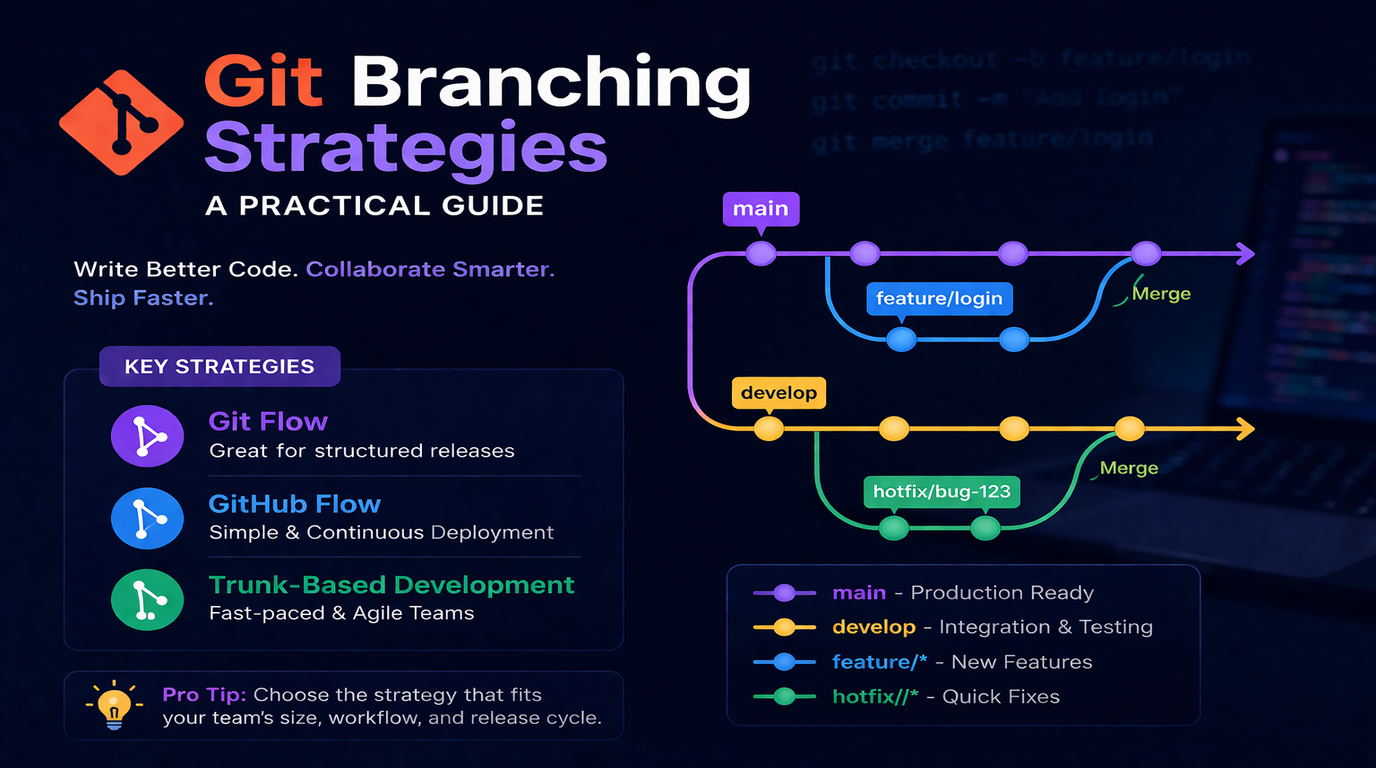
GitHub Flow is the simplest strategy. There is one rule: main is always deployable.
How It Works
- Create a feature branch from
main - Make commits and push regularly
- Open a Pull Request when ready
- Team reviews the code
- Merge to
mainafter approval - Deploy
mainto production
Branch Naming
feature/add-user-auth
fix/checkout-total-calculation
chore/update-dependencies
Best For
- Small teams (2-5 developers)
- Continuous deployment (deploy multiple times per day)
- SaaS products and web apps
- Teams that want minimal process
Watch Out
GitHub Flow assumes you can deploy main at any time. If you need staging environments or release trains, it is too simple.
Strategy 2: Gitflow (Structured Releases)
Gitflow adds more structure with dedicated branches for development, releases, and hotfixes.
How It Works
main- Production-ready code only. Tagged with version numbers.develop- Integration branch for features. Always ahead of main.feature/*- Branch from develop, merge back to develop.release/*- Branch from develop when ready to release. Bug fixes go here. Merge to both main and develop.hotfix/*- Branch from main for urgent production fixes. Merge to both main and develop.
Branch Naming
feature/CAN-123-add-subscription-billing
release/2.4.0
hotfix/fix-payment-timeout
Best For
- Teams with scheduled releases (weekly, bi-weekly, monthly)
- Products with multiple environments (dev, staging, production)
- Projects that need version numbers
- Larger teams (5-15 developers)
Watch Out
Gitflow adds complexity. If you deploy continuously, the release branch is unnecessary overhead. Many teams adopt Gitflow and then skip the release branch entirely.
Strategy 3: Trunk-Based Development (Move Fast)
Trunk-based development takes the opposite approach to Gitflow: everyone commits to main (the trunk) as frequently as possible.
How It Works
- Developers create very short-lived branches (hours, not days)
- Each branch has a small, focused change
- Merge to main multiple times per day
- Feature flags control what users see in production
- Automated tests gate every merge
Best For
- Teams with strong CI/CD pipelines and automated testing
- Companies deploying to production multiple times daily
- Experienced teams that can write small, incremental changes
- Organizations like Google, Meta, and Netflix
Watch Out
Trunk-based development requires excellent test coverage and CI/CD. Without automated tests catching regressions, merging to main constantly will break things. It also requires discipline - large features must be broken into small, safe increments behind feature flags.
Comparison Table
| Factor | GitHub Flow | Gitflow | Trunk-Based |
| Complexity | Low | High | Medium |
| Release frequency | Continuous | Scheduled | Continuous |
| Team size | 2-5 | 5-15 | Any |
| Branch lifespan | Days | Days to weeks | Hours |
| Merge conflicts | Occasional | Common | Rare |
| CI/CD requirement | Recommended | Optional | Required |
| Feature flags needed | No | No | Yes |
Our Recommendation
At Logic Providers, we use a modified GitHub Flow for most projects:
- main is always deployable
- Feature branches are named
feature/TICKET-description - Every PR requires at least one code review
- We merge to main and deploy to staging first, then promote to production
- Hotfixes branch from main and get fast-tracked through review
For client projects with scheduled releases, we add a develop branch (Gitflow-lite) to accumulate features before cutting a release.
Practical Tips That Prevent Merge Hell
- Keep branches short-lived. Merge within 1-2 days. The longer a branch lives, the harder it is to merge.
- Pull from main daily. Rebase or merge main into your feature branch every morning to catch conflicts early.
- Make small, focused PRs. A 50-line PR gets reviewed in minutes. A 500-line PR sits for days.
- Use draft PRs. Open a draft PR early to signal what you are working on and avoid duplicate work.
- Automate what you can. Branch naming rules, PR templates, and CI checks reduce human error.
- Delete merged branches. Stale branches confuse the team. Set up auto-delete on merge.
Summary
There is no perfect branching strategy - only the right one for your team. Start with GitHub Flow if you are a small team deploying frequently. Move to Gitflow if you need structured releases. Consider trunk-based if you have strong CI/CD and want maximum velocity. The best strategy is the one your whole team understands and follows consistently.